Tropico 7 Dev-Log #3 | The animation behind Tropicans

Good morning, good afternoon and good evening, Tropicans!
In case you’re wondering: The celebration is not over yet! After all, when you’re in Tropico, the party never stops!
To celebrate our 20th anniversary like true Presidentes, we’re publishing not one but two Tropico 7 dev-logs this month (that’s double the fun). And today is the day that Penultimo managed to gather all the materials for the next one!
Last time, we talked about the simulation behind the Tropicans – for this dev-log, Gaming Minds Studios gives us an incredible insight into the animation process and showcases how the citizens and the world around them are being brought to life.
Contrary to what El Presidente’s political opponents say, the citizens are not being controlled by some evil masterminds – instead, there are logical processes, motion capture, and a whole lot of love behind it.
We’ve taken advantage of Penultimo’s guidance and have put together the following agenda for you:
No more hesitation – let’s dive straight into the animation!
1) Animation as part of the simulation
In a city-building game, it’s important for the city to look and feel alive. As all citizens in Tropico are simulated and can be watched (legally, of course) during their daily routines, their animation is part of the simulation. In particular, we focus on how the citizens move through the streets.
However, the animations of Tropico 7 include much more:
To make it more realistic, not all pedestrians move in the same way
Vehicles are much larger and easier to see than pedestrians, especially when the camera is zoomed out a little further. It was therefore important to us that vehicles move as realistically as possible.
To ensure that buildings look varied and organic, many have large, open areas. When workers are on site, it makes sense to animate them in these areas and have them carry out tasks.
Buildings visited by citizens can have open areas that look empty without animations. So, visitors need to be animated here, too – for example, in the market square.
Buildings themselves also need to be animated. If a building features objects that usually move, we need to animate them as well, otherwise it looks too static. Examples include a wind turbine, a drilling rig or a port facility with cranes.
There are lots of other animations, such as ripples on the water, waterfalls, animated vegetation, and more.
2) A detailed look at the animation of Tropico 7
The walking animation of the citizens
Most citizens move along pavements, roads and between buildings using a walking animation.
There are other, different variations of the standard walking animation:
Some citizens limp on their way to or from hospital because they are in pain
Children tend to hop and skip along
Very elderly citizens move more slowly or even walk with a frame
If armed troops are approaching or a building is on fire, citizens flee by running
There are also many other special animations, such as those for soldiers and firefighters.
And most importantly: All citizens are always walking on sunshine because they’re living in the greatest city ever.
From vehicles to parking spaces to U-turns
Most of the vehicles in Tropico 7 are privately owned cars or lorries that transport goods and resources. There are also police cars, fire trucks, ambulances, tethered balloons, helicopters, aeroplanes, cargo ships, and more.
Let’s take a closer look at the vehicles on the roads – because as soon as the camera is positioned a little higher, it’s mainly the vehicles on the roads that we see. The following points were crucial to us here:
Most roads have parking lanes. It was important to us that cars didn’t just pop up at the start of a journey and vanish at the end.
Cars look for parking spaces. If the parking space is on the other side of the road, cars can also make a U-turn into a parking space.
Cars can drive out of parking spaces. However, it will only do so once the road is clear.
Cars can make U-turns when the road is clear. To turn around, vehicles can also use building entrances.
At junctions, every vehicle must wait until it is their turn.
All these measures are designed to help ensure that the animations on the streets look smooth and realistic.
By the way, parked cars are an important aspect in a game like Tropico. Why? Because with their unique looks, vibrant colors, and vintage charm, they truly bring the world to life and indicate where there's a lot of activity in the world.

Animation sequences of a worker
It would look rather dull if all factories were simply closed buildings of different shapes. It’s more interesting to design them with open spaces, such as this fish farm here:

Of course, open spaces like this can quickly look empty. Everyone expects to see animations featuring the people who are actually working there.
In fact, these animations are the most complex and numerous in the entire game. To ensure these animations were appropriate, work on animating a building only began once the building had been fully modelled with all its details. This ensured that the workers could interact with all the visible and relevant objects within the building. Here are a few examples:
When a worker starts their shift, they go into a small building with a door and put on their work clothes there. They come out and proceed with further actions.
Workers go to a pile of crates, pick up a crate and take it inside.
If there are ladders or stairs on the site, workers can climb them. Of course, this again requires special walking animation.
There is a large saw on the carpentry workshop site. An employee goes there and operates the saw.


A worker’s complete sequence of movements is always made up of several individual animations. If, for example, a worker is to operate a saw, then repair a fuse box, and then carry a box into the building, the following animations would be required:
Walking
Operating at standing height
Walking
Bending down and operating at knee height
Walking
Bending down and picking up a crate
Walking with a crate in their arms
We recorded every single animation step using motion capture. Guido, the animation artist at Gaming Minds Studios, put on a jumpsuit covered in sensors and pretended to interact with a wide variety of objects at different heights (he’s a true Tropican!). The movements were recorded, digitalized and transferred to the workers in-game.

But that’s not all. Every worker must know where on the site they are allowed to move and what they can do at what spot. For this reason, all areas within which a worker is permitted to move are defined by using standard pathfinding (the green areas in the next shot). Within these areas are activity points at which specific animations can be played (these are the text fields with the IDs). Using a logic system, the workers are now sent from one point to the next, from the start of their shift to the end.

When a worker arrives at a site, they are first sent to their starting point. This can be a fixed point or one of several random points. For example:
First, they are sent to the door of a building. There, they go inside and get changed. They now have several options, from which they choose the point ‘climbladder_start’. Once there, they can only climb up the ladder, thereby reaching the ‘climbladder_end’ point. Here, they check the drive wheels. The ‘climbladder_end’ point defines which animation should be used and how long the animation should last. From this point, they can climb back down and then proceed to another point if their shift is not yet over.
In total, there are 278 different animations for the citizens in Tropico, and 10 - 30 animation points per building.
The animation of visitors
Residents can visit buildings, such as the church. Once inside, they can be directed to various activity points. They can go inside the church and sit down, or they can walk around the church grounds.
The technology behind this and the processes are the same as for workers, except that visitors spend significantly less time at the buildings than workers do.

How buildings come to life
The final category of animations we’d like to describe is the animation of buildings in Tropico 7.
These animations add variety to the game world and the buildings. That’s why, when designing the buildings, we looked to see if there were any objects that suited the building type well and could be animated in a way that was clearly visible. As the buildings in Tropico are meant to look quite realistic, we didn’t want to overdo it, but with certain buildings (such as factories) there are plenty of possibilities.
A few good examples can be seen in this shot:
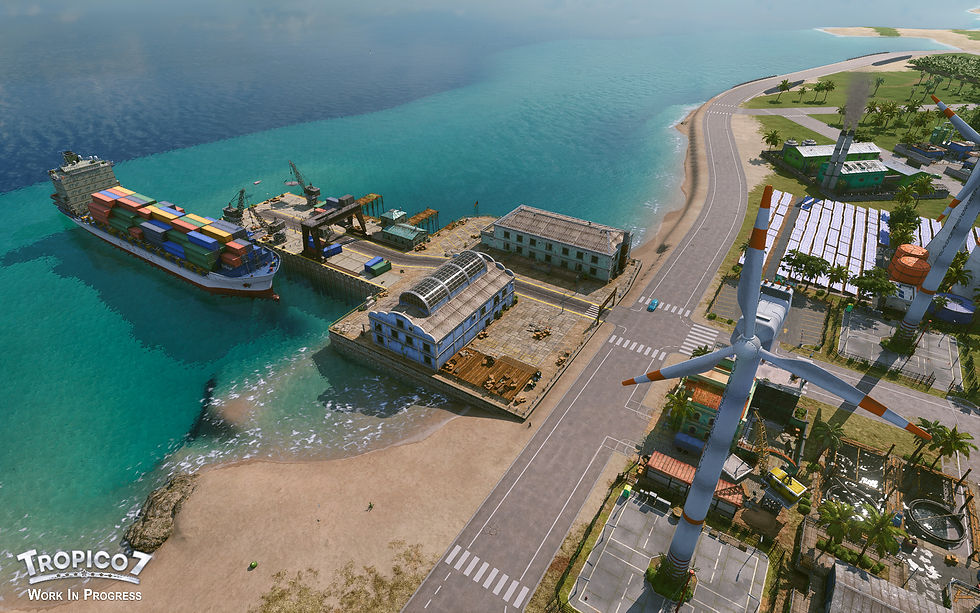
The wind turbine on the right is animated whilst the building is generating electricity.
The cargo ship docks at the harbour and the cranes at the facility move back and forth and rotate.
The factory’s chimneys are smoking whilst the factory is in operation.
This concludes our third dev-log for Tropico 7!
We hope you enjoyed this technical side of the development process.
Stay tuned for more, Tropicans – we’ll have some more news coming very soon! (Considering Penultimo has finalized the documents…)
Don’t forget to add Tropico 7 to your wishlist and show El Presidente your much appreciated loyalty!
While the dev team continues to work hard on the game, let us know what you thought of this dev-log on Discord, Steam or any of our social channels!